Threat landscape continues to evolve, with attackers employing increasingly sophisticated techniques to target sensitive information & compromise security systems. Recent reports have highlighted the emergence of phishing attacks utilizing encrypted RPMSG attachments sent through compromised Microsoft 365 accounts. These attacks pose significant risks to email security gateways and the protection of Microsoft credentials. This Threatfeed delves into the nature of these attacks, explores the characteristics of RPMSG files, and discusses strategies to detect, counter, and mitigate the associated risks.
Understanding Encrypted RPMSG Attachments and Phishing Attacks
Encrypted RPMSG files, short for restricted permission message files, are a file format utilized by Microsoft's Rights Management Services (RMS) to provide an extra layer of protection for sensitive information. These files allow authorized recipients to access and authenticate the content while ensuring its confidentiality. However, cybercriminals have now harnessed RPMSG attachments to deceive users and extract Microsoft credentials.
Phishing attacks leveraging RPMSG attachments follow a common modus operandi. Attackers compromise Microsoft 365 accounts and use them to send phishing emails containing RPMSG files. The emails typically mimic trusted senders and employ social engineering techniques to lure recipients into opening malicious attachments. Once the recipient attempts to access the encrypted content, a fake login form is presented, which prompts the victim to enter their Microsoft account credentials. The attackers then harvest this information for malicious purposes.
Exploiting Email Security Gateways and Concealing Attacks
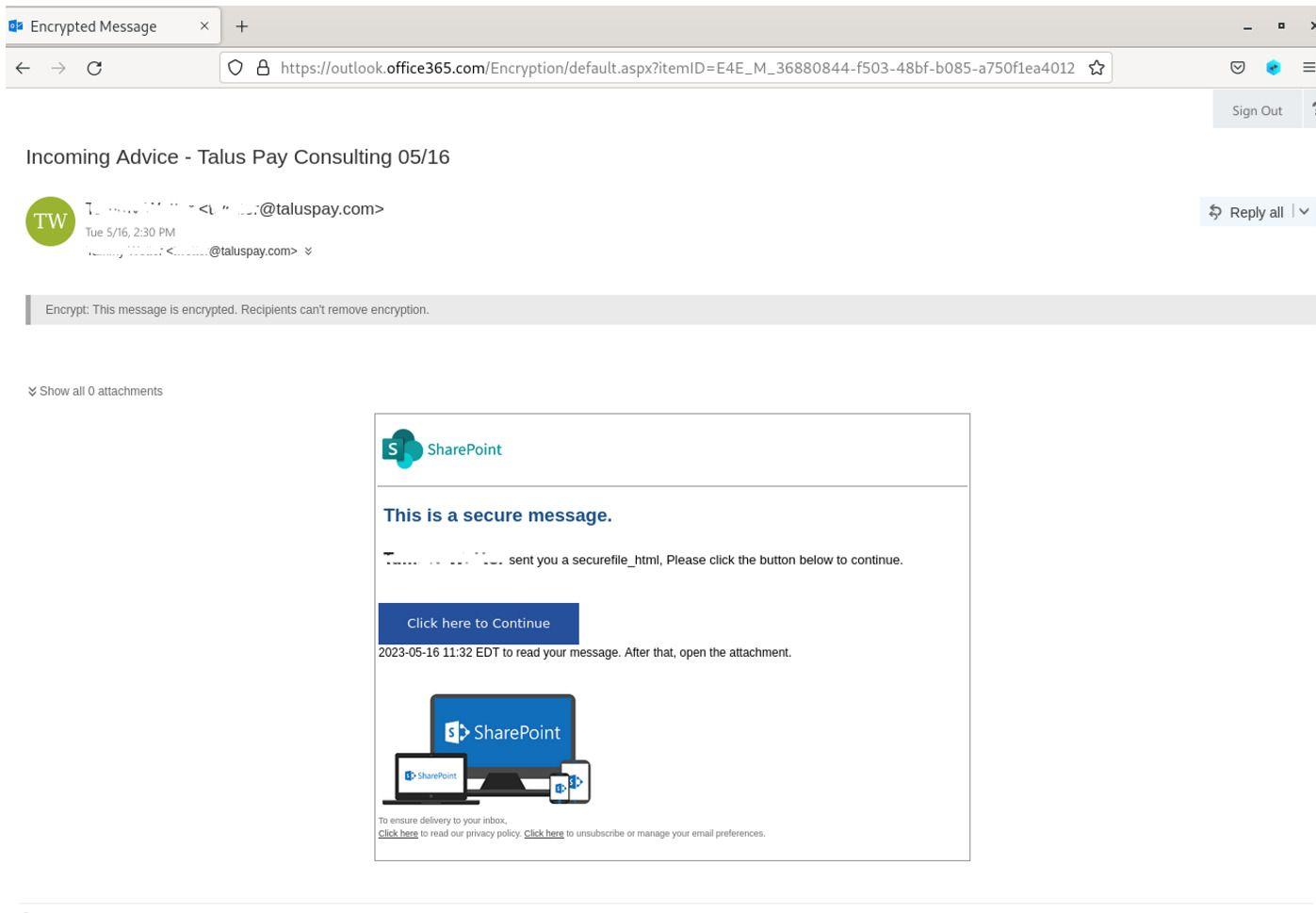
One of the primary challenges with these phishing attacks is their ability to evade detection by traditional email security gateways. By encrypting the message within the RPMSG file, attackers effectively conceal the malicious intent of the email, making it difficult for security systems to identify and mitigate the risks effectively. Furthermore, the RPMSG files often contain embedded links or hyperlinks that redirect unsuspecting victims to seemingly legitimate websites, such as the Office 365 sign-in page or fake SharePoint documents, creating a false sense of trust and legitimacy.
*Protected Phishing Mails*
Additionally, attackers employ techniques like Adobe's InDesign service, where a seemingly harmless document prompts users with a message such as _"Click here to Continue."_ Once clicked, the document redirects the victim to an empty page displaying the text _"Loading...Wait,"_ which is actually a delay tactic to execute a malicious script in the background. This script collects valuable system information, including visitor ID, connect token, hash, video card renderer information, system language, device memory, hardware concurrency, installed browser plugins, browser window details, and OS architecture. Armed with this information, the attacker can create a cloned Microsoft 365 login form hosted on their servers, further complicating the detection process.
Detecting, Countering, & Mitigating the Threat
As these attacks continue to evolve, it is crucial to adopt proactive measures to detect, counter, and mitigate their risks. Here are some recommended strategies:
Enhanced Email Scanning Gateways: Organizations should strengthen their email security gateways by utilizing advanced threat detection mechanisms capable of analyzing encrypted attachments and identifying suspicious RPMSG files. By leveraging machine learning algorithms and anomaly detection techniques, these gateways can flag and quarantine potentially malicious emails for further analysis and investigation.
Multi-Factor Authentication (MFA): Implementing MFA adds an additional layer of protection to Microsoft accounts, making it significantly harder for attackers to gain unauthorized access even if credentials are compromised. Enforcing MFA across all user accounts within an organization can greatly reduce the likelihood of successful phishing attacks.
User Awareness and Education: Organizations should invest in comprehensive cybersecurity awareness training for their employees, educating them about the risks associated with phishing attacks, including the specific techniques employed by attackers using encrypted RPMSG attachments. By promoting a culture of vigilance and providing employees with the necessary knowledge and tools to identify and report suspicious emails, organizations can effectively mitigate the impact of these attacks.
Regular Security Updates: Staying up to date with the latest security patches and updates for Microsoft 365 is crucial in mitigating the risks associated with phishing attacks. Microsoft frequently releases security updates and patches to address vulnerabilities exploited by attackers. By promptly applying these updates, organizations can stay one step ahead in protecting their systems and data.
Vulnerability
Estée Lauder Oracle E-Business Suite Data Breach Exposes SSNs, Passports, Health Records
Estée Lauder reveals a data breach caused by an Oracle E-Business Suite flaw, exposing sensitive data and prompting security response measures.